Isn’t it already described in Dapper docs? Sure it is. Why do I bother to write this? Am I just wtiting it for the sake of “posting”? No, I am not. Actually, I was trying to write the code by using Dapper’s docs. Unfortunately, I ran into a few bugs. I am using .NET 9, by the way and this is not even a blog post; it’s just a code snippet. I thought I should share it, may be someone else is facing the same problem as me.
[Read More]Inserting bulk records (1 million) in SQL Server
Creating a database
USE master
GO

DROP DATABASE IF EXISTS BookMillion
GO

CREATE DATABASE BookMillion
GO

USE [BookMillion]
GO

CREATE TABLE [dbo].[Book](
	[Id] [int] IDENTITY(1,1) NOT NULL,
	[Title] [nvarchar](100) NULL,
	[Author] [nvarchar](100) NOT NULL,
	[Country] [nvarchar](100) NULL,
	[ImageLink] [nvarchar](100) NULL,
	[Language] [nvarchar](20) NULL,
	[Link] [nvarchar](200) NULL,
	[Pages] [int] NULL,
	[Year] [int] NULL,
	[Price] [int] NULL

	CONSTRAINT PK_Book_Id PRIMARY KEY (Id)
)
GO
Bulk insert using recursive cte
USE [BookMillion]
GO

WITH Numbers AS (
SELECT 1 AS N
UNION ALL
SELECT N + 1
FROM Numbers
WHERE N < 1000000
)
insert into Book (Title,Author,Country,[Language],ImageLink,Link,Pages,Price,[Year])
select
'Book'+ cast(N as varchar),
'Author'+ cast(N as varchar),
'Country'+ cast(N as varchar),
'Language'+ cast(N as varchar),
'ImageLink'+ cast(N as varchar),
'Link'+ cast(N as varchar),
ABS(CHECKSUM(NEWID())) % 901 + 100, -- Pages between 100-1000
ABS(CHECKSUM(NEWID())) % 901 + 100, -- Price between 100-1000
ABS(CHECKSUM(NEWID())) % 825 + 1200 -- Year between 1200-2024
from Numbers

option (maxrecursion 0)

GO
Keyset Pagination In Entity Framework Core
First we need to know about the traditional offset based pagination and the problems it introduces.
Offset pagination
In the code below we are using the offset pagination.
[HttpGet("offset")]
public async Task<IActionResult> GetBooks(int limit=10, int page=1)
{
    var books = await _context.Books
        .AsNoTracking()
        .OrderBy(a => a.Id)
        .Skip(limit * (page - 1))
        .Take(limit)
        .ToListAsync();
    return Ok(books);
}
Which translates to the following sql:
SELECT
   [b].[Id],
   [b].[Author],
   [b].[Country],
   [b].[ImageLink],
   [b].[Language],
   [b].[Link],
   [b].[Pages],
   [b].[Price],
   [b].[Title],
   [b].[Year]
FROM [Book] AS [b]
ORDER BY [b].[Id]
OFFSET @__p_0 ROWS
FETCH NEXT @__p_1 ROWS ONLY
Note: In every pagination logic, ordering must be unique. In our case we are using Id which is unique.
Rest Api Designing Best Practices

There are some common practices one should take care of while designing REST APIs.
There is also a video version of this post.
1. Use descriptive names for resources
- ❌ /api/getAllBooks
- ❌ /api/retrieveBooks
- ❌ /api/manageBooks
- ❌ /api/process
- ✅ /api/books
2. Use nouns not verbs
- ❌ /api/mangage-books
- ✅ /api/books
3. Use plural nouns
| ❌ Singular Nouns | ✅ Plural Nouns |
|---|---|
| /api/book | /api/books |
| /api/movie | /api/movies |
| /api/person | /api/people |
| /api/customer | /api/customers |
4. Use hyphens (-) in url for better readabilty
- ❌ /api/useraccounts
- ✅ /api/user-accounts
5. Never use crud method names in url
| HttpMethod | ❌❌❌ | ✅✅✅ |
|---|---|---|
| GET | /api/books/GetAllBooks | /api/books |
| GET | /api/books/GetBookById/{id} | /api/books/{id} |
| POST | /api/books/CreateBook | /api/books |
| PUT | /api/books/UpdateBook/{id} | /api/books/{id} |
| DELETE | /api/books/DeleteBook/{id} | /api/books/{id} |
6. Use http method properly
| HttpMethod | Endpoint | Description |
|---|---|---|
| GET | /api/books | Indicates a get resources |
| GET | /api/books/{id} | Indicates a get resource with id |
| POST | /api/books | Indicates creating a resource |
| PUT | /api/books/{id} | Indicates updating a resource |
| DELETE | /api/books/{id} | Indicates deleting a resource |
7. Use Http StatusCodes Correctly
These are the most commonly used status codes.
[Read More]Covering Indexes In Sql Server
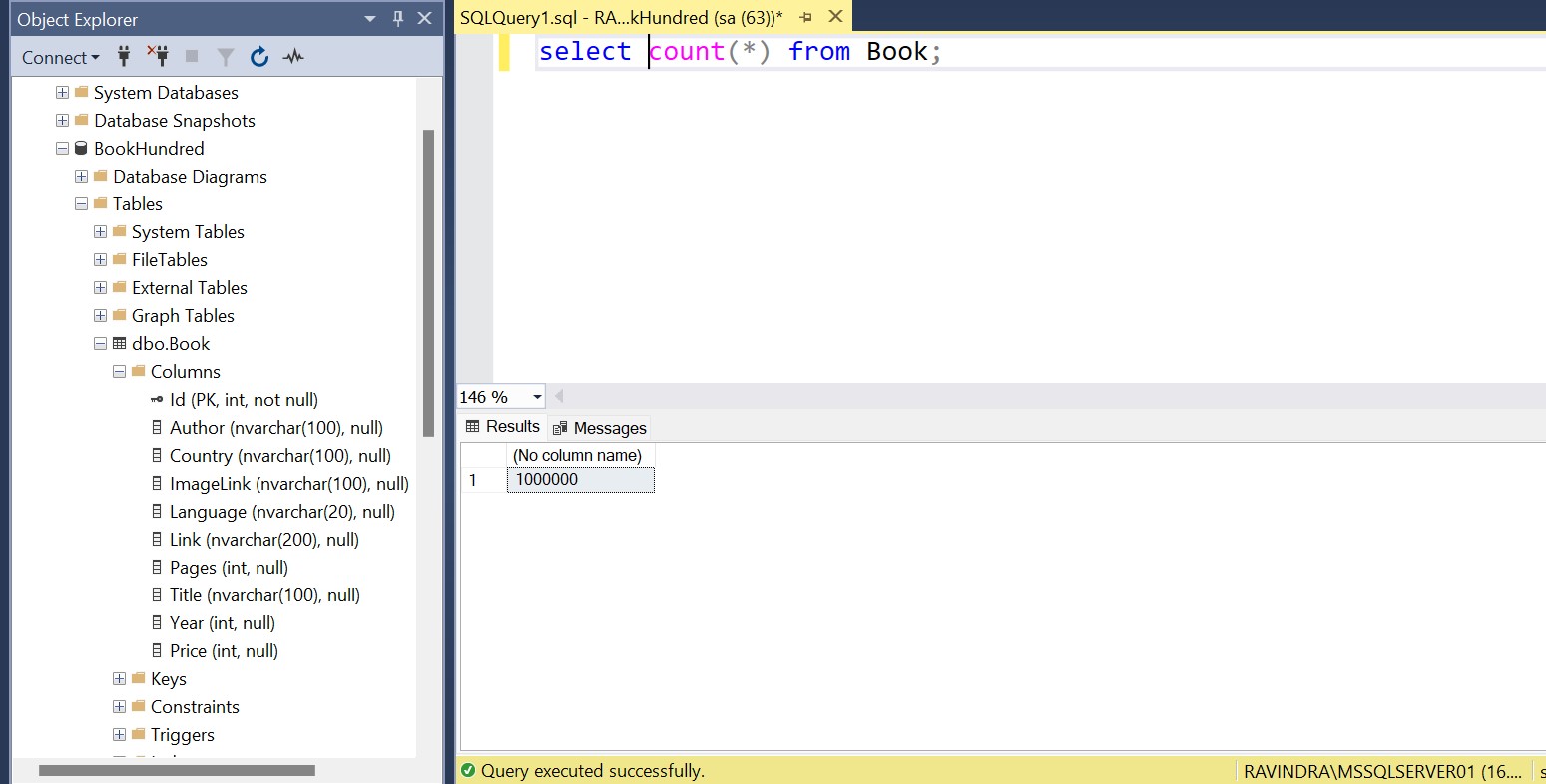
Table structure and total records
Let’s look at our table structure as shown in the left panel of the picture
Note: There is a non-clustered index on the Title column of the Book table, which has a total of 1 million records.
select
  Id,
  Title,
  Author,
  Price
from Book where title='The Divine Comedy'
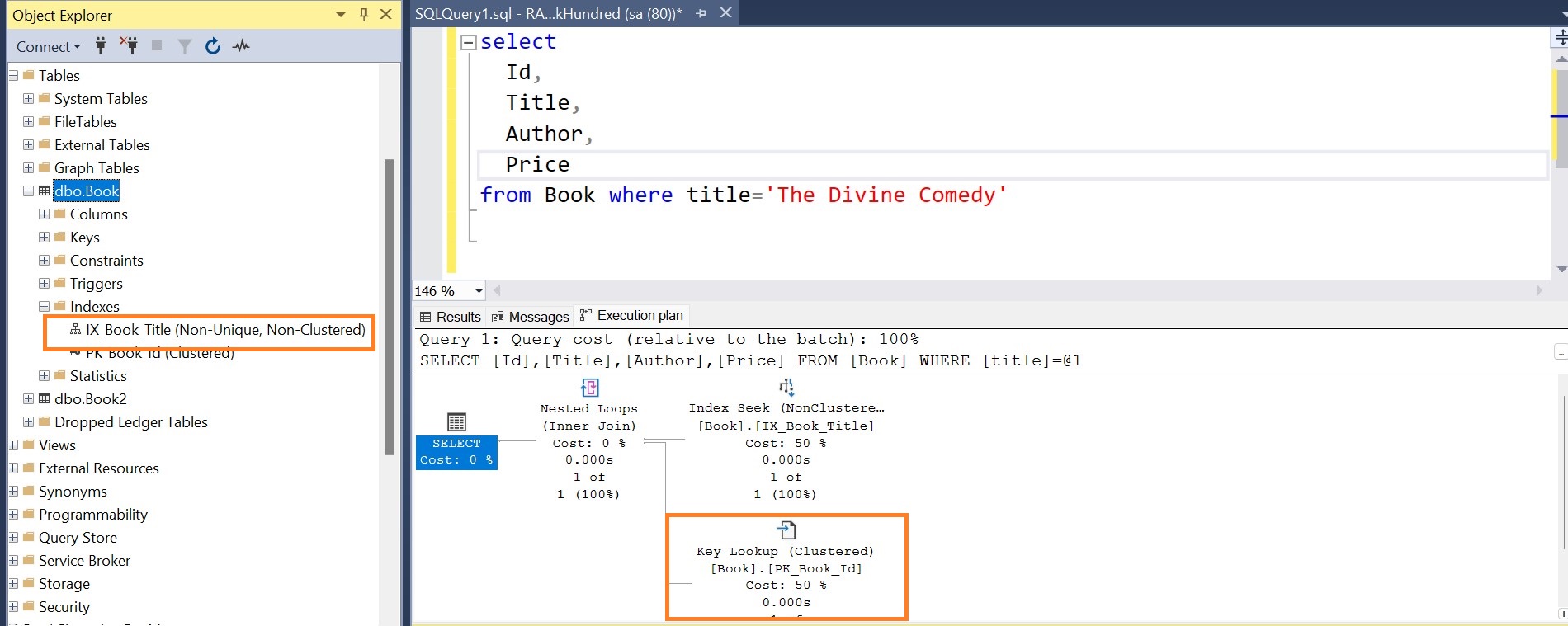
As you have noticed in the execution plan, there is a key lookup. Since index is only available for the Title column, Title is retrieved from the non-clustered index. However, other columns like Id, Author and Price are not present in the non-clustered index, so they will be retrieved from the clustered index (the Book table). This results in an additional key lookup step and may decrease the performance. It’s like, you are looking for records in two places (non clustered index and clustered index).
Dotnet Service Lifetime : AddTransient(), AddScoped(), AddSingleton()
Example Setup
I am using a MinimalApi application. Create a new one if you need.
dotnet new webapi -n DITest
Open it in a IDE or editor of your choice.
public interface IMyService
{
    Guid InstanceId { get; }
}

public class MyService : IMyService
{
    public Guid InstanceId { get; }

    public MyService()
    {
        InstanceId = Guid.NewGuid();
        // We are logging in the constructor, so that we get notified whenever the instance is created
        Console.WriteLine($"==> Service created with InstanceId: {InstanceId}");
    }
}
IMyService have a read-only property named InstanceId of type Guid, which is set from the constructor.
We are logging inside the constructor, so that we can get notified whenever the new instance is created.
LINQ: Zip() operator

There is also a video version of this tutorial.
Let’s understand it with example.
int[] nums1 = [1, 2, 3, 4];
int[] nums2 = [3, 4, 5, 6];

IEnumerable<int>? product = nums1.Zip(nums2, (n1, n2) => n1 * n2);

Console.WriteLine(string.Join(", ", product));  // 3, 8, 15, 24
Let’s break it down:
IEnumerable<int>? product = nums1.Zip(nums2, (n1, n2) => n1 * n2);
It takes nums1[i] and nums2[i], evaluates it (nums1[0]*nums2[0]) and returns it. Here i is the index of the array. For example.
SingleAsync vs SingleOrDefaultAync vs FirstAsync vs FirstOrDefaultAsync vs FindAync
I don’t think there is any need of introduction. Let’s jump to the code section. We coders understand with code more. Let’s understand the concept then you don’t need to remember any definition.
This is the recordset against which I am running queries.
| Id | FirstName | LastName |
|---|---|---|
| 1 | John | Doe |
| 2 | Ravindra | Devrani |
| 3 | Mohan | Singh |
| 20 | Mahesh | Soni |
| 21 | John | Snow |
First and foremost let’s say we need a record with LastName=”Doe”.
[Read More]Database Firsts Approach In EF Core
I have used database first approach in the .NET Framework 4.X. But It is the first time I am trying to use Db First approach in the .NET Core (I am using .net 9). Microsoft refers it ‘Scaffolding (Reverse Engineering)’. Personally I prefer Dapper for DB First approach. May be you have an existing database and you want to use it with ENTITY FRAMEWORK, then this approach might be helpful. I am playing around it and documenting it and sharing that journey with you. Let’s see what it offers.
Curious Case of LINQ Group By
Schema
- Department (DepartmentId, Name)
- Employee (EmployeeId, Name, DepartmentId)
Result set I need
Show all departments with total number of employees. Do not skip the departments which have 0 employees. As shown below:
DepartmentIdNameTotalEmployees1Engineering22Marketing13HR0
I have applied various queries and checked their equivalent sql.
1. Straightforward but skips the department which has no employees
This query does not meet my requirement. It would be a good choice if I don’t need departments without any employees.
[Read More]