TODO app is the most common way to understand basic crud (create, read, update and delete) feature of the language or framework or a ui library. But I prefer plain CRUD with form and table. In this way one can learn to use form along with validation also to display them in a table. It is a good way to learn CRUD for data driven appications like admin-panel for entries.
Source code: Githu repo
Tech and tools used
- Bash as a terminal. I would recommend git bash to windows users.
- Visual Studio Code aka VS Code as a code editor
- Json server for backend (fake backend and easy to setup)
- React 19 for front end.
- Daisy ui for designing a frontend. It is a utility library over tailwind css.
- React hook form
- Zod for schema validation
Let’s create a react app with vite
Open the terminal and go to the path where you want to create a project. Then run this command:
npm create vite@latest
It will ask few things
Enter the Project name : react-json-server-crud.
Select a framework ‘React’.
Select variant ‘Typescript’.
Then it will ask which linter to use, I am selecting ‘EsLint’.
At last, it will ask “Install with npm and start now?” select “Yes”. It will scaffold the project and install all the mandatory nuget package. If you select “No”, then you have to manually install the nuget packages with “npm i” (Only if you select no).
If it shows something like this:
VITE v8.1.5  ready in 397 ms

  ➜  Local:   http://localhost:5173/
  ➜  Network: use --host to expose
  ➜  press h + enter to show help
It means project is running. You can check it at this endpoint http://localhost:5173/ in browser.
Note: Stop this project by Ctrl+C.
Execute code react-json-server-crud which opens this project in vs code and close the terminal there is no need of it.
I am assuming that you are inside the vs code. Press ctrl and `(backtick/tilde) symbol to open the integrated terminal.
Fire npm run dev to start the project. It is not necessary to run this command now, run it whenever you need to run your project. You need to run the
project once and it will hot reload after that.
Notice these:
npm run devto run frontent project- ctrl + ` to stop the project
Clean some files, we don’t need the boilerplate
Erase the content of App.css and Index.css. Replace App.tsx with this content:
function App() {
  return (
    <>
    </>
  )
}

export default App
Install required packages
npm i tailwindcss @tailwindcss/vite daisyui react-hook-form zod @hookform/resolvers axios
- tailwindcss: utility library for css
- daisyui: CSS library built over tailwind
- react-hook-form: A form with a lot of features like built in validation.
- zod: Schema library for validation
- axios: To make http calls
Let’s create a backend now
- Run
npm i -D json-server
-D means, it will be installed as a dev dependency and won’t be shipped with project’s published files.
Create a file named
db.jsonat the root directory/folder.Paste this content in the
db.json
{
    "people": [
        {
            "id": "1",
            "firstName": "John",
            "lastName": "Doe"
        },
        {
            "id": "2",
            "firstName": "Master",
            "lastName": "Roshi"
        },
        {
            "id": "3",
            "firstName": "Shinosuke",
            "lastName": "Nohara"
        }
    ]
}
- Edit
package.jsonfile and include this line"server": "npx json-server db.json"inside thescriptsobject.package.jsonscripts section will look like this:
"scripts": {
    "dev": "vite",
    "build": "tsc -b && vite build",
    "lint": "eslint .",
    "preview": "vite preview",
    "server": "npx json-server db.json"
  },
Since db.json is in root and vite will reload the application on any change in file, which causes a reload in every create, update and delete
operation and makes the application a non-spa. To stop this, configure vite.config.ts as below:
export default defineConfig({
  server: {
    watch: {
      ignored: ['**/db.json'] // Add this line
    }
  },
  plugins: [
    react(),
    tailwindcss()
  ],
})
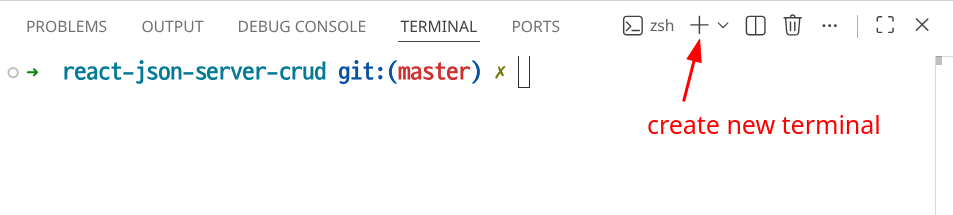
- Open a new integrated terminal, as shown below:
- Run
npm run serverto run the backend.
Now, our backend is up and running. Our endpoint is http://localhost:3000/people.
Let’s configure the tailwind css and daisy ui:
Update vite.config.ts with this
import { defineConfig } from 'vite' // new line
import react from '@vitejs/plugin-react'
import tailwindcss from '@tailwindcss/vite'

// https://vite.dev/config/
export default defineConfig({
  plugins: [
    react(),
    tailwindcss() // new line
  ],
})
Add this line in index.css (which is cleaned by us btw.):
@import "tailwindcss";
@plugin "daisyui";
Environment file.
Create a file named .env at the root directory/folder and add this content:
VITE_BASE_URL=http://localhost:3000
In this way we can retrieve endpoint in any file and maintain the DRY (do not repeat yourself) principle. If this endpoint changes in the future you won’t need to change
it in 10 different files. Also you can create a separate .env file for production, staging or testing.
Create these files
If you are using windows then find the equivalent command or just create manually in vs-code.
- Directory:
mkdir src/person
mkdir src/services
- Files:
touch src/person/PersonType.tsx src/person/Person.tsx src/person/PersonForm.tsx src/person/PersonList.tsx
touch src/services/api.ts
Person/PersonType.tsx
It is a model for the database schema.
export type PersonType = {
    id: string,
    firstName: string,
    lastName: string
}
Services/Api.tsx
import axios from "axios";

export const api = axios.create({
    baseURL: import.meta.env.VITE_BASE_URL,
    timeout: 1000
});
Person/PersonForm.tsx
import { useForm } from "react-hook-form";
import type { SubmitHandler } from "react-hook-form";
import { z } from 'zod';
import { zodResolver } from "@hookform/resolvers/zod";
import type { PersonType } from "./PersonType";
import { useEffect } from "react";

type IFormInput = z.infer<typeof schema>;
// In this way type of usForm will exactly match to zod schema

interface IPersonForm {
    editingPerson: PersonType | null,
    onSubmit: (person: PersonType) => void
}

const schema = z.object({
    id: z.string(),
    firstName: z.string()
        .min(1, "First name is required")
        .max(30, "First name can not exceed 30 characters"),
    lastName: z.string()
        .min(1, "Last Name is required")
        .max(30, "Length of FirstName can not exceed 30 characters"),
});

export default function PersonForm({ editingPerson, onSubmit }: IPersonForm) {
    const { handleSubmit, register, reset, formState: { errors, isValid, isDirty } } = useForm({
        resolver: zodResolver(schema),
        mode: 'onChange',
        defaultValues: {
            id: ''
        }
    });

    useEffect(() => {
        if (editingPerson) {
            const { id, firstName, lastName } = editingPerson;
            reset({
                id,
                firstName,
                lastName
            })
        }
    }, [editingPerson]);

    const onFormSubmit: SubmitHandler<IFormInput> = (data) => {
        onSubmit(data);
        reset({ id: '', firstName: '', lastName: '' });
    }

    return (<>
        <form className="w-full max-w-3xl" onSubmit={handleSubmit(onFormSubmit)}>
            <input type="hidden" {...register("id")} />

            <div className="flex flex-wrap items-end gap-4">
                <div className="form-control">
                    <label className="label"><span className="label-text">First Name</span></label>
                    <input className="input input-bordered" {...register("firstName")} />
                    {errors.firstName && <span className="text-red-500 text-sm">{errors.firstName.message}</span>}
                </div>

                <div className="form-control">
                    <label className="label"><span className="label-text">Last Name</span></label>
                    <input className="input input-bordered" {...register("lastName")} />
                    {errors.lastName && <span className="text-red-500 text-sm">{errors.lastName.message}</span>}
                </div>

                <div className="flex gap-2">
                    <button type="button" className="btn btn-default" onClick={() => reset({ id: '', firstName: '', lastName: '' })}>Reset</button>
                    <button type="submit" className="btn btn-primary" disabled={!isValid || !isDirty}>Save</button>
                </div>
            </div>
        </form >
    </>)
}
Person/PersonList.tsx
import type { PersonType } from "./PersonType"

interface IPersonList {
    people: PersonType[],
    onEdit: (person: PersonType) => void,
    onDelete: (person: PersonType) => void,
}
export default function PersonList({ people, onEdit, onDelete }: IPersonList) {
    return (
        <div className="overflow-x-auto">
            <table className="table">
                <thead>
                    <tr>
                        <th>First Name</th>
                        <th>Last Name</th>
                        <th>Action</th>
                    </tr>
                </thead>
                <tbody>
                    {
                        people.map((person) =>
                            <tr key={person.id}>
                                <td>{person.firstName}</td>
                                <td>{person.lastName}</td>
                                <td className="flex gap-3">
                                    <button className="btn btn-accent" onClick={() => onEdit(person)}>Edit</button>
                                    <button className="btn btn-error" onClick={() => { onDelete(person) }}>Delete</button>
                                </td>
                            </tr>)
                    }
                </tbody>
            </table>
        </div>
    )
}
Person/Person.tsx
import { useEffect, useState } from "react";
import PersonForm from "./PersonForm";
import type { PersonType } from "./PersonType";
import PersonList from "./PersonList";
import { api } from '../services/api';

export default function Person() {
    const [editingPerson, setEditingPerson] = useState<PersonType | null>(null);
    const [people, setPeople] = useState<PersonType[]>([]);
    const [loading, setLoading] = useState(true);
    const [error, setError] = useState('');
    const apiUrl = "/people";

    useEffect(() => {
        console.log("Loaded...");
        async function fetchPeople() {
            try {
                const response = await api.get(apiUrl);
                setPeople(response.data);
            }
            catch (error) {
                console.log(error);
                setError('Something went wrong!');
            }
            finally {
                setLoading(false);
            }
        }

        fetchPeople();
    }, []);

    function handleSubmit(person: PersonType) {
        setLoading(true);
        if (person.id === '') {
            addPerson(person);
        }
        else {
            updatePerson(person);
        }
    }

    async function addPerson(person: PersonType) {
        try {
            const response = await api.post(apiUrl, person);
            setPeople([...people, response.data]);
        }
        catch (error) {
            console.log(error);
            setError('Something went wrong!');
        }
        finally {
            setLoading(false);
        }
    }

    async function updatePerson(person: PersonType) {
        try {
            await api.put(apiUrl + "/" + person.id, person);
            setPeople(people.map(p => p.id === person.id ? person : p));
        }
        catch (error) {
            console.log(error);
            setError('Something went wrong!');
        }
        finally {
            setLoading(false);
        }
    }

    function handleEdit(person: PersonType) {
        setEditingPerson(person);
    }

    async function handleDelete(person: PersonType) {
        if (!window.confirm("Are you sure to delete?")) return;

        try {
            await api.delete(apiUrl + "/" + person.id);
            setPeople(people.filter(p => p.id !== person.id));
        }
        catch (error) {
            console.log(error);
            setError('Something went wrong!');
        }
        finally {
            setLoading(false);
        }
    }

    return (
        <>
            <h2 className="text-2xl">People management</h2>

            {loading && <p>Loading...</p>}

            {error && <p>{error}</p>}

            <PersonForm editingPerson={editingPerson} onSubmit={handleSubmit} />

            {people.length > 0 ?
                <PersonList people={people} onEdit={handleEdit} onDelete={handleDelete} /> : <p>No record(s) found.</p>
            }
        </>
    )
}
App.tsx
import Person from "./person/Person"

function App() {
  return (
    <div className="p-2">
      <Person />
    </div>
  )
}

export default App
