Azure Blob Storage : CRUD With AspNetCore Mvc & SQL Server

Azure Blob Storage : CRUD With AspNetCore Mvc & SQL Server

Azure blob storage is a storage solution provided by microsoft. You can store data like images, audio, video, json files, zip files etc etc in the azure.

What are we going to learn?

  • How to create a web application that stores and manipulate the images in the cloud.
  • We will perform all the CRUD (create, read, update and delete) operations.

Tech used

  • .NET Core 9 (MVC app)
  • SQL server 2022
  • Azure storage account

High level overview

  • We will save image url in the database and images in the storage account(blob container)

Let’s create an storage account first

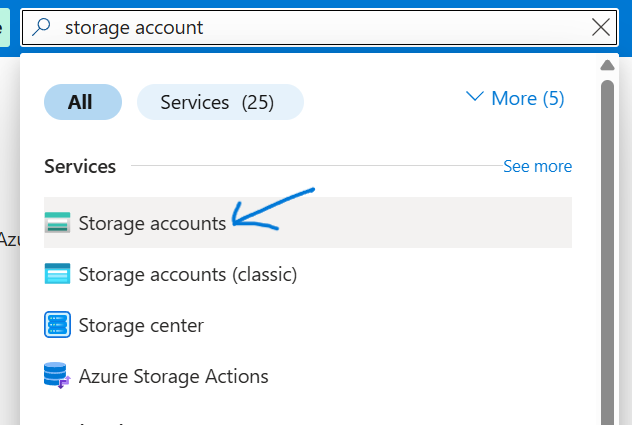
Step 1: create azure storage account 1

[Read More]

Cosmos DB For NoSQL - CRUD With Dotnet

Cosmos DB For NoSQL - CRUD With Dotnet

Azure Cosmos DB for NoSQL is a fully managed and serverless NoSQL and vector database for modern app development, including AI applications and agents. With its SLA-backed speed and availability as well as instant dynamic scalability, it is ideal for real-time NoSQL applications that require high performance and distributed computing over massive volumes of NoSQL and vector data.

Soruce: learn.microsoft.com, you can learn more about it from here

[Read More]

Dotnet: All you need to know about middlewares

Dotnet: All you need to know about middlewares
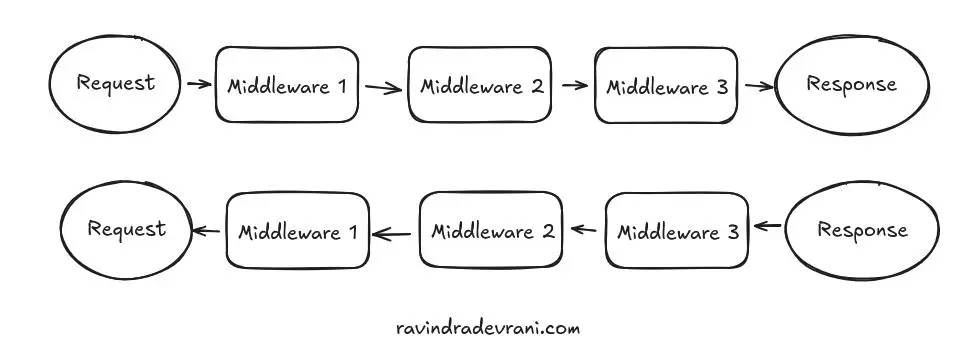
  • In dotnet, a Middleware is a piece of code that runs in the request pipeline.
  • Middlewares are put together in a sequence, and their order matters.
  • When a request is made, it goes through each of the middleware.
  • Response flow back in reverse order through the middleware.
  • Each middleware has capability to modify the request or short circuits the pipeline.
  • Each middleware can change the response before it’s sent to the client.

middleware pipeline in .net core

[Read More]

Jwt Authention and role base authorization in Dotnet Core

Jwt Authention and role base authorization in Dotnet Core

Create a new web api project

Run these commands in a sequence to create a new project.

dotnet new sln -o JwtDotnet9

cd JwtDotnet9

dotnet sln add JwtDotnet9/JwtDotnet9.csproj

Open the project in vs code.

code .

=> Source Code

=> Securing The .NET 9 App: Signup, Login, JWT, Refresh Tokens, and Role Based Access with PostgreSQL

Install the required nuget packages

dotnet add package Microsoft.AspNetCore.Authentication.JwtBearer

Jwt configuration in appsettings

Open appsettings.json and add these lines

[Read More]

IEnumerable Vs IQueryable In C#

IEnumerable Vs IQueryable In C#

There has been a discussion around town about the difference between an IEnumerable and an IQueryable, especially in c# interviews. I won’t be diving into the fact that IEnumerable is part of the System.Collections namespace and IQueryable belongs to System.Linq namespace (or did I???). Rather, I’ll focus on the practical usage of both—how they work, and when to use each.

IQueryable

 public IActionResult GetPeople()
 {
  // It will retrieve 2 records from database 
  IQueryable<Person> people = _context.People.Take(2); 
  //  Note: At the above line, no data will be retrieved from the database

  return Ok(people); // Data will be retrieved here
 }

Corresponding sql

Note that, I am using Sqlite, the above code is translated to this query:

[Read More]

Bulk insert in dapper with table valued parameter

Bulk insert in dapper with table valued parameter

There might be instances when you want to insert bulk data. For an instance, you want to create an order, where you need to add multiple items. Let’s see how can we insert bulk data in c# using dapper.

Note: It is only good for adding bunch of rows. But if you are looking for adding hundreds of rows then better to use other approaches. There are many, if you look out.

[Read More]

EF Core under the hood: Count() vs Any()

EF Core under the hood: Count() vs Any()

Let’s say you want to execute a code block when Book table is not empty. In Entity Framework Core, we can achieve this in two ways (there might be others but I am unaware of them):

Option 1:

 if(context.Books.Count()>0)
 {
     // do something
 }

Option 2:

 if (context.Books.Any())
 {
     // do something
 }

Note 📢: I am testing these queries against a table containing 1 million rows.

[Read More]

How to Install DotNet SDK In Ubuntu Based Distros?

My Distro

I am using linux mint 22.1 which is based on Ubuntu 24.04.

Straightforeward command

sudo apt-get update

sudo apt-get install -y dotnet-sdk-9.0

But…

I have tried to run this command sudo apt-get install -y dotnet-sdk-9.0 but unfortunately I got no success. I have found that, this command works only with Ubuntu 24.10. For Ubuntu 24.04 I need to use different approach.

Uninstall prior version if exists

sudo apt-get remove dotnet-sdk-8.0

Now, run these commands in a sequence:

[Read More]

Dapper: Output Parameter

Stored procedure

CREATE OR ALTER PROCEDURE [dbo].[CreateTrackEntry]
  @EntryDate DATE,
  @SleptAt DATETIME2,
  @WokeUpAt DATETIME2,
  @NapInMinutes SMALLINT,
  @TotalWorkInMinutes SMALLINT,
  @Remarks NVARCHAR(1000) = NULL,
  @TrackEntryId INT OUTPUT
AS
BEGIN
   -- code removed for brevity

END

We have a stored procedure that returns TrackEntryId as an output parameter. Let’s see how can we execute it from the dapper?

using IDbConnection connection = new SqlConnection(_connectionString);

var parameters = new DynamicParameters(trackEntryToCreate);
// Input params
parameters.Add("@EntryDate", trackEntryToCreate.EntryDate);
parameters.Add("@SleptAt", trackEntryToCreate.SleptAt);
parameters.Add("@WokeUpAt", trackEntryToCreate.WokeUpAt);
parameters.Add("@NapInMinutes", trackEntryToCreate.NapInMinutes);
parameters.Add("@TotalWorkInMinutes", trackEntryToCreate.TotalWorkInMinutes);
parameters.Add("@Remarks", trackEntryToCreate.Remarks);

// output params
parameters.Add("@TrackEntryId", dbType: DbType.Int32, direction: ParameterDirection.Output);

await connection.ExecuteAsync("CreateTrackEntry", parameters,commandType:CommandType.StoredProcedure);

int trackEntryId = parameters.Get<int>("@TrackEntryId");

Configuring dotnet core apps for OpenApi with SwaggerUi or Scalar

Configuring dotnet core apps for OpenApi with SwaggerUi or Scalar

SwaggerUI, which was previously bundled with .NET Core APIs, has been dropped in .NET 9. However, .NET Core Web APIs still support generating OpenAPI documents. .NET Core apps have built-in support for generating information about endpoints and it uses Microsoft.AspNetCore.OpenApi package for that. To configure interactive UIs for these OpenAPI documents, we have several options. We are going to explore these two:

  1. Swashbuckle SwaggerUI
  2. Scalar

Create a new project, if does not have an existing

Execute these commands in a sequence

[Read More]